Problem Description
Yeti and Pink Bean arrived at the Mushroom Castle and saw mushrooms of various colors and patterns. Yeti wanted to gather mushrooms of the same pattern, while Pink Bean wanted to gather mushrooms of the same color.
Game Rules
Connexion is a turn-based game played by two players. The game is played using a game board and game tiles. The game consists of a Preparation Phase, a Placement Phase, and a Scoring Phase.
Game Board
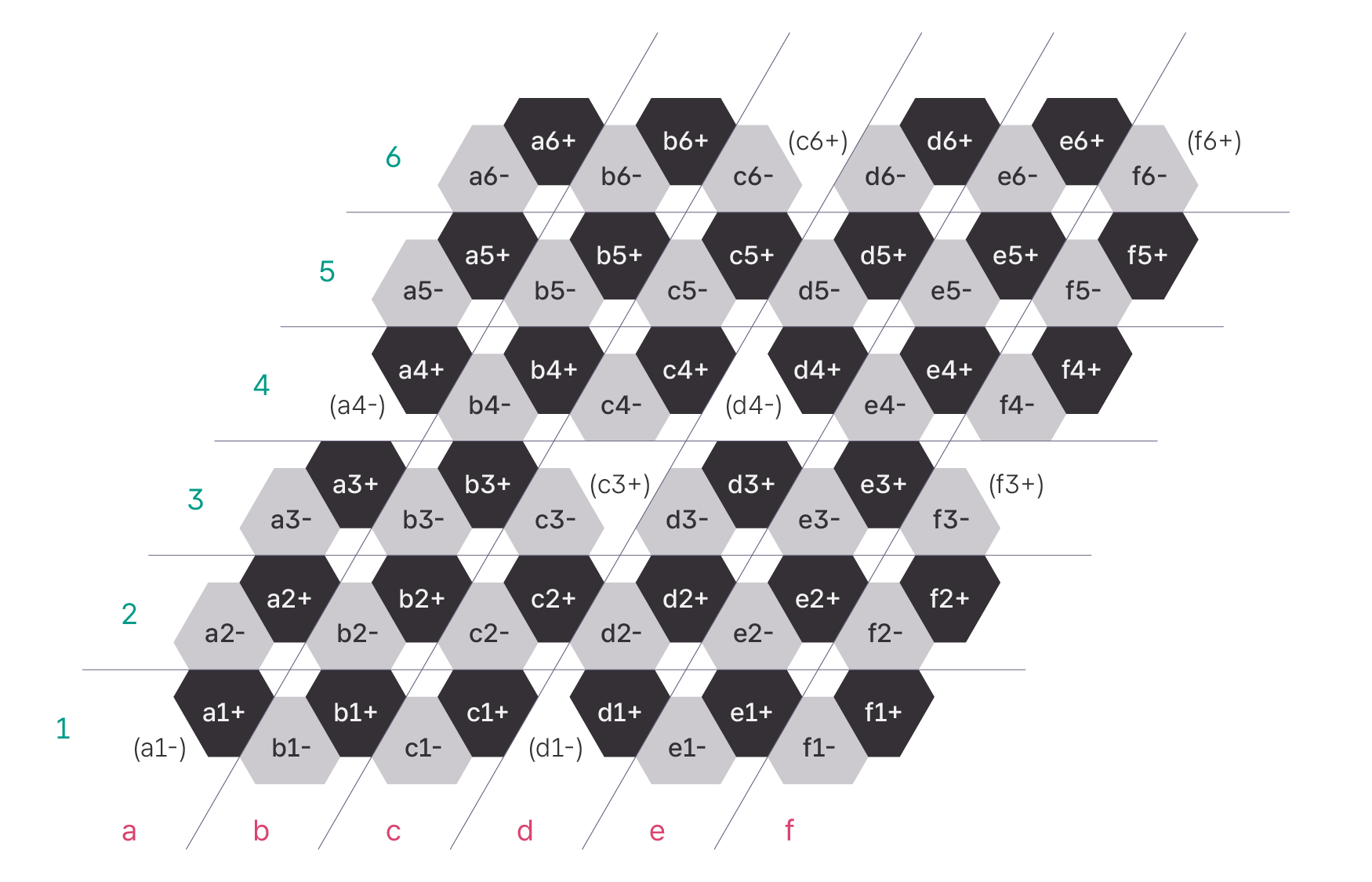
The game board is shaped as shown above, consisting of a total of cells. The coordinates of each board cell can be represented as an ordered triplet (column, row, sign).
- There are columns from left to right:
a,b,c,d,e,f. - There are rows from bottom to top:
1,2,3,4,5,6. - At the intersection of each column and each row, there are two cells:
-and+.
A cell is represented by concatenating the column character, the row character, and the sign.
Out of the possible triplets of columns, rows, and signs, the following triplets are not used:
a1-,a4-,c3+,c6+,d1-,d4-,f3+,f6+
Each cell is connected in the following manner:
- A
-cell is connected to the following three cells (if they exist):- The
+cell of the same column and row, - The
+cell of the column immediately to the left and the same row, - The
+cell of the same column and the row immediately below.
- The
- A
+cell is connected to the following three cells (if they exist):- The
-cell of the same column and row, - The
-cell of the column immediately to the right and the same row, - The
-cell of the same column and the row immediately above.
- The
For example, c5- is connected to c5+, b5+, and c4+, while f4+ is connected to f4- and f5-.
Game Tiles
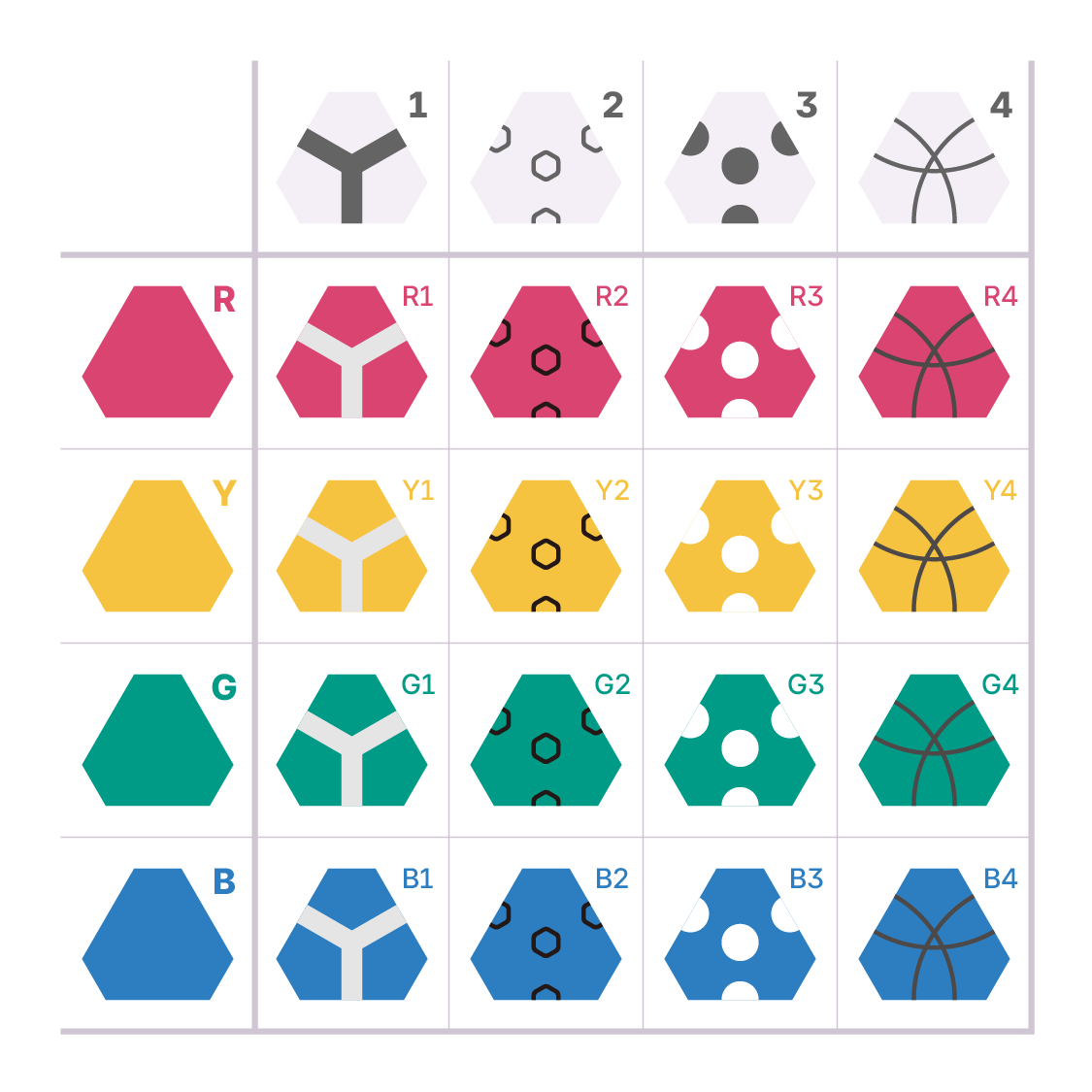
Connexion game tiles have colors and patterns. There are types of colors, namely
R (

)
,
G (

)
,
B (

)
, and
Y (

)
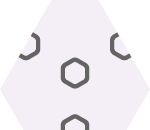
. There are types of patterns, namely
1 (

)
,
2 (
)
,
3 (

)
, and
4 (

)
. There are 4 tiles each, for the different pairings of colors and patterns, making a total of tiles. A tile is represented as two characters, concatenating the color and the pattern.
Preparation Phase
Determine the first and second players. Each player takes tiles, tiles of each pairings of colors and patterns. Each player shuffles tiles, and puts them in a bag. Finally, each player draws tiles from their bag and places them in front of them so everyone can see. 1
Placement Phase
The placement phase consists of turns in total. Each person takes turns starting from the first player.
- Place one of the tiles in front of you on one of the empty cells of the game board.
- If there are tiles left in the bag, draw one tile from the bag and place it in front of you. 1 In the last five placement turns, drawing tile is ommitted as no tiles are left in bag.
Scoring
If tiles placed in two adjacent cells have the same color, they are said to be connected by color; if they have the same pattern, they are said to be connected by pattern.
The scores can be calculated using either of the following two methods. The scores calculated by both methods are identical. The person with the higher score wins; if scores are equal, the game ends with draw.
Calculation by Tile
The first and second players calculate their score respectively. The score for each tile is:
- First player: The number of tiles indirectly connected2 by the same pattern.
- Second player: The number of tiles indirectly connected2 by the same color.
The score of each player is the sum of the scores of all tiles.
Calculation by Group
The first and second players group tiles respectively.
- First player: All tiles reachable by following connections of the same pattern are grouped together.
- Second player: All tiles reachable by following connections of the same color are grouped together.
The score for each group is . The total score is the sum of the scores of all groups.
Scoring Example
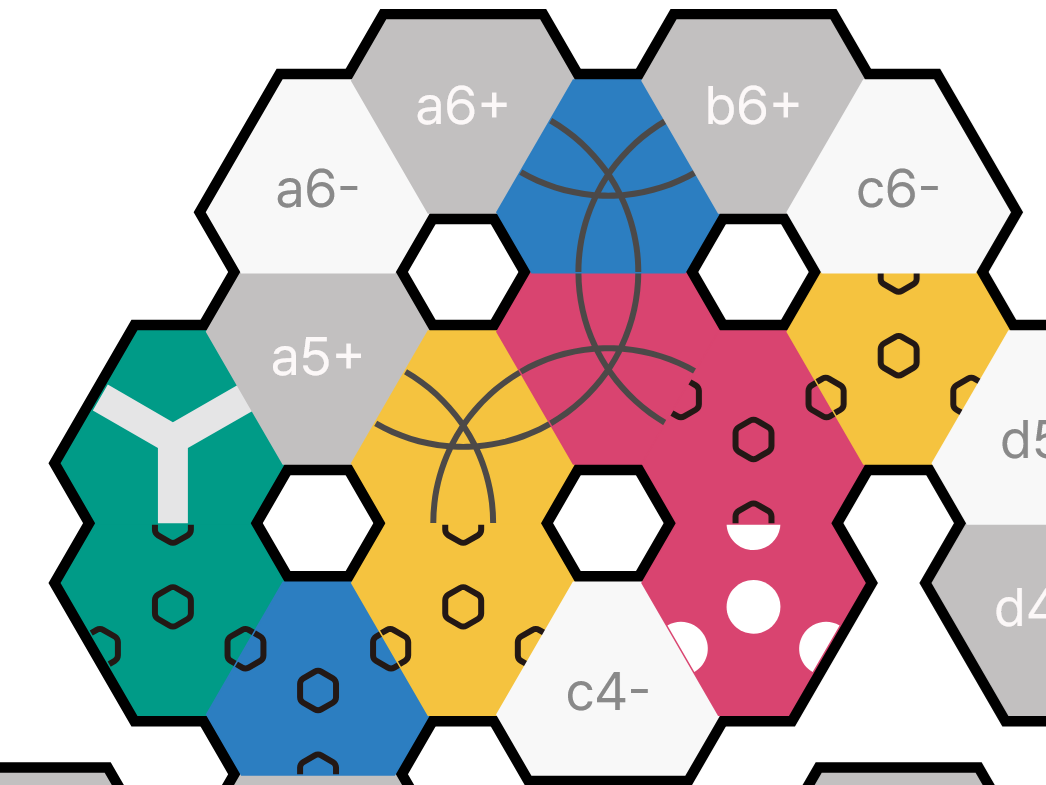
The image above shows tiles placed at: (a4+, G2); (a5-, G1); (b4-, B2); (b4+, Y2); (b5-, Y4); (b5+, R4); (b6-, B4); (c4+, R3); (c5-, R2); (c5+, Y2). The scoring is as follows:
First Player (Pattern)
- 1 ():
- 2 ():
- 3 ():
- 4 ():
Total Score:
Second Player (Color)
-
R (
)
: -
Y (
)
: -
G (
)
: -
B (
)
:
Total Score:
Input/Output Protocol
Your program must read input line by line and follow the protocol of each command. Commands requiring the output are denoted with red color with their time limit specified. If your program fails to output within specified time limit, you will receive Time Limit Exceeded (TLE) verdict and will result forfeiting the game.
| Command | Input Format | Description |
|---|---|---|
| READY | READY (FIRST|SECOND) | Indicates whether your program takes first or second player. Must output OK within ms as a response. |
| INIT | INIT A₁ A₂ A₃ A₄ A₅ B₁ B₂ B₃ B₄ B₅ | Indicates the 5 tiles drawn by your program () and the 5 tiles drawn by the opponent's program () during a preparation phase. |
| TIME | TIME t₁ t₂ | Indicates it is your program's turn. Also provides remaining time for both players; is yours, is the opponent's (in ms). You must output PUT p T within ms to place tile at position . The initial is given as ms, regardless of time used for READY command. |
| GET | GET T | Indicates your program drew tile after the placement of tile. If the bag is empty so drawing tile is omitted, is X0. Output is not required. |
| OPP | OPP p T₁ T₂ t | Indicates the opponent placed at , drew , while taking ms. If the bag was empty, is X0. Output is not required. |
| FINISH | FINISH | Indicates the end of the game. The program must terminate properly and immediately, regardless of the current status of the game. Output is not required. |
All commands must be processed line by line. When you output, make sure you print a newline character and then flush the buffer. Please refer to the reference document or sample code of your programming language on how to flush the buffer.
Sample Code
The following are sample codes provided for each language:
- C20: sample-code.c
- C++20: sample-code.cpp
- C#: sample-code.cs
- OpenJDK Java 21: sample-code.java
- Node.js: sample-code.js
- Typescript: sample-code.ts
- PyPy3 / Python3: sample-code.py
- Rust 2024: sample-code.rs
- Lua: sample-code.lua
- Go: sample-code.go
- Kotlin: sample-code.kt
The sample code places a tile in a valid position that maximizes the immediate score.
Match with Sample AI
If the submitted code compiles successfully, it will compete against the provided sample code. Two matches will be played, alternating between first and second player. Points are awarded as follows:
- Win: +1 win
- Draw: +0.5 win
- Loss: +0 win
Testing Tool (GUI)
A testing tool, testing-tool-connexion, is provided to test the program. You can test your compiled executable or script locally, using python, java, node, or lua in your envinroment.
- 64-bit Windows (x86-64) (Download)
- Run the downloaded
.exefile.
- Run the downloaded
- MacOS Universal (Download)
- Double-click the
.dmgfile, then drag and drop thetesting-tool-connexionfile into theApplicationsfolder. Then, run the app. - If a security warning appears regarding apps not from the App Store, check the app info in "Settings > Privacy & Security".
- Double-click the
- deb (Ubuntu/Debian AMD64) (Download)
- Install the
.debfile usingaptordpkg, then runtesting-tool-connexion.
- Install the
- rpm (Fedora/RHEL x86-64) (Download)
- Install the
.rpmfile usingrpmoryum, then runtesting-tool-connexion.
- Install the
Testing Tool (CLI)
A CLI testing tool package, testing-tool-connexion-cli.zip (Download), is provided to test the program. For details, refer to the README.md inside the zip file.
You can freely modify the CLI testing tool and discuss its execution methods with others. However, you must not share modified tools or log files generated by the tool with anyone outside your team, nor discuss them.
You will receive log files having same format with testing tool, in the submission result dialogue. However, actual grading program is implemented differently from the testing tool, a successful execution in the testing tool does not always guarantee a successful execution in the actual grading.
Visualization Tools
You can download log files for each battle from the Sample AI matches. Use the Log Visualization Tool to examine how the game progressed and refine your strategy.
Example
Example input
R1 Y3 B1 G4 Y1 B3 Y2 R3 G1 R2 G3 G1 R2 R1 B4 G4 B2 Y2 R3 Y4 B1 R4 B4 B2 Y4 G2 R4 Y3 G2 B3 G3 Y1
G3 Y3 R1 Y2 R3 R1 Y1 B1 G1 R3 G2 Y4 Y2 Y3 B3 B2 B4 G2 R2 B4 R4 Y1 G4 R4 G3 Y4 G1 G4 B1 R2 B2 B3
Example interaction
| First player input | First player output | Second player input | Second player output | Log output |
|---|---|---|---|---|
READY FIRST | OK | READY SECOND | OK | |
INIT R1 Y3 B1 G4 Y1 G3 Y3 R1 Y2 R3 | INIT G3 Y3 R1 Y2 R3 R1 Y3 B1 G4 Y1 |
| ||
TIME 10000 10000 | (Took 70ms)
| |||
GET B3 | OPP a1+ R1 B3 70 | FIRST a1+ R1 B3 70 | ||
TIME 10000 9930 | (Took 40ms)
| |||
OPP a2- R1 R1 40 | GET R1 | SECOND a2- R1 R1 40 | ||
TIME 9930 9960 | (Took 80ms)
| |||
GET Y2 | OPP a2+ B1 Y2 80 | FIRST a2+ B1 Y2 80 | ||
TIME 9960 9850 | (Took 50ms)
| |||
OPP b1- R3 Y1 50 | GET Y1 | SECOND b1- R3 Y1 50 | ||
| (Omitted) | ||||
TIME 980 1730 | (Took 100ms)
| |||
OPP f4+ Y1 X0 100 | GET X0 | SECOND f4+ Y1 X0 100 | ||
FINISH | (Terminate program) | FINISH | (Terminate program) |
|
|