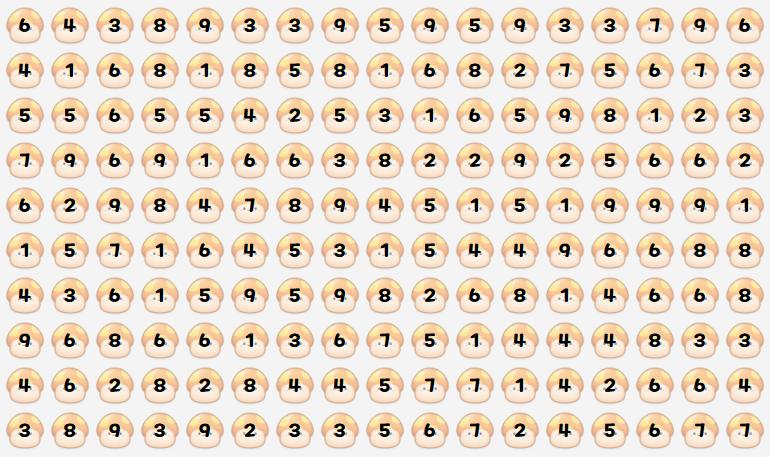
Problem Description
In the peaceful forest of Maple World, Yeti and Pink Bean were tending to their mushroom grid together as usual.
One day, they discovered that every mushroom had a digit written on it, so they decided to create a new game using these digits.
They made a game where they compete to own parts of the mushroom grid, alternating turns using following rules.
Game Rules
-
Rule 1
On their turn, a player selects a single rectangular area in the mushroom grid. -
Rule 2
If the sum of the digits within the selected area is exactly , the mushrooms in that area are removed and the player owns that area.
If the area contains cells already owned by the opponent, the ownership of those cells is taken over.
Additionally, each of the four sides of the selected rectangle must have at least one mushroom inscribed to the rectangular area. -
Rule 3
If no areas can be selected or a player strategically chooses not to make a move, they may skip their turn and pass. -
Rule 4
The game ends when both players pass their turns consecutively.
The player who owns more cells at the end of the game wins.
Become a Yeti or Pink Bean and own as many cells as possible in the mushroom grid by writing a program.
Input/Output Protocol
Your program must read input line by line and follow the protocol of each command. Commands requiring the output are denoted with red color with their time limit specified. If your program fails to output within specified time limit, you will receive Time Limit Exceeded (TLE) verdict and will result forfeiting the game.
| Command | Input Format | Description |
|---|---|---|
| READY | READY (FIRST|SECOND) | Indicates whether your program takes first or second player. Must output OK within 3 seconds as a response. |
| INIT | INIT ... | Indicates the game board information. ... consists of strings, each consisting of digits. Each digit is an integer between and inclusive, representing the number on the mushroom at corresponding position. Output is not required Each digit is drawn independent and identically from digits through . |
| TIME | TIME t₁ t₂ | Indicates it is your program's turn. Also provides remaining time for both players; is yours, is the opponent's (in ms). Upon receiving this command, the player must output the coordinates of the rectangle selected for this turn in the format . The top-left coordinate of the board is , and the bottom-right is . To pass, output . Output values must satisfy: The initial is given as ms, regardless of time used for READY command. |
| OPP | OPP x₁ y₁ x₂ y₂ t | Indiciates the coordinates selected by the opponent, while taking ms during their turn. If the opponent passed, is given. Output is not required. |
| FINISH | FINISH | Indicates the end of the game. The program must terminate properly and immediately, regardless of the current status of the game. Output is not required. |
All commands must be processed line by line. When you output, make sure you print a newline character and then flush the buffer. Please refer to the reference document or sample code of your programming language on how to flush the buffer.
Sample Code
The following are sample codes provided for each language:
- C20: sample_code.c
- C++20: sample_code.cpp
- C#: Main.cs
- OpenJDK Java 21: Main.java
- Node.js: sample_code.js
- Typescript: sample_code.ts
- PyPy3 / Python3: sample_code.py
- Rust 2024: sample_code.rs
- Lua: sample_code.lua
- Go: sample_code.go
- Kotlin: sample_code.kt
The sample code selects and outputs the rectangle that is lexicographically smallest among all valid rectangles, i.e. the top-left rectangle. If no selectable rectangle exists, it passes the turn.
Matches with Sample AIs
If the submitted code compiles successfully, it will compete against a total of 7 sample AIs.
The program will play 2 matches against each sample AI, alternating between going first and second. Scores based on wins and losses are as follows:
- Win: +1 win
- Draw: +0.5 win
- Loss: +0 win
The strategies of the sample AIs are as follows:
| Battle No. | Description | Code |
|---|---|---|
| 1 / 2 | Always "Passes" on its turn. | Code |
| 3 / 4 | Uses the same strategy as provided in the sample code. | Code |
| 5 / 6 | Uses the strategy of the game simulator sample AI, Pink Bean. | Code |
| 7 / 8 | Uses a medium-level defensive strategy. | Code |
| 9 / 10 | Uses a medium-level offensive strategy. | Code |
| 11 / 12 | Uses a high-level defensive strategy. | Code |
| 13 / 14 | Uses a high-level offensive strategy. | Code |
Note: Sample AI codes were not provided during the actual contest.
Visualization Tools (Sample AI / Two-Player / Log Analysis)
You can play the game against sample AIs, play with two people alternating turns, and use a visualization tool to visualize logs generated by the game simulator and testing tools.
You can download log files for each battle from the Sample AI matches. Use the Log Visualization Tool to examine how the game progressed and refine your strategy.
Testing Tool (GUI)
A testing tool, testing-tool-mushroom, is provided to test the program. You can test your compiled executable or script locally, using python, java, node, or lua in your envinroment.
- 64-bit Windows (x86-64) (Download)
- Run the downloaded
.exefile.
- Run the downloaded
- MacOS Universal (Download)
- Double-click the
.dmgfile, then drag and drop thetesting-tool-mushroomfile into theApplicationsfolder. Then, run the app. - If a security warning appears regarding apps not from the App Store, check the app info in "Settings > Privacy & Security".
- Double-click the
- 64-bit Ubuntu (AMD64) (Download)
- Install the
.debfile usingaptordpkg, then runtesting-tool-mushroom.
- Install the
- 64-bit RedHat (x86-64) (Download)
- Install the
.rpmfile usingrpmoryum, then runtesting-tool-mushroom.
- Install the
Testing Tool (Command Line, Python Script)
A CLI testing tool, testing_tool.py (Download), is provided to test the program. The testing tool is a program written in Python 3.12. Regarding the execution of this program, please refer to [Python Setup and Usage].
You can freely modify the CLI testing tool and discuss its execution methods with others. However, you must not share modified tools or log files generated by the tool with anyone outside your team, nor discuss them.
You will receive log files having same format with testing tool, in the submission result dialogue. However, actual grading program is implemented differently from the testing tool, a successful execution in the testing tool does not always guarantee a successful execution in the actual grading.
To use the testing tool, create a setting.ini file in the same location as testing_tool.py. The content should be as follows:
INPUT=<Path to input file>
LOG=<Path to log file>
EXEC1=<Command to run the first player's program>
EXEC2=<Command to run the second player's program>
For example, if the input is input.txt in the same folder, the log is output to log.txt, the command for the first player is ./Main.exe, and the command for the second player is python3 main.py --test, you would write:
INPUT=./input.txt
LOG=./log.txt
EXEC1=./Main.exe
EXEC2=python3 main.py --test
Testing Tool Input Format and Log Interpretation
The input file for the testing tool represents the initial state of the board. The board must consist of lines, each containing digits from to . Then, run testing_tool.py. After execution, the logs will be output to the specified log file ./log.txt.
The logs output the following information:
INIT <s₁> <s₂> ... <s₁₀>- Indicates that the
i-th row of the board is<sᵢ>when the game starts.
- Indicates that the
<FIRST/SECOND> <r₁> <c₁> <r₂> <c₂> <time>- Indicates that the first (
FIRST) or second (SECOND) player selected the area from row<r₁>, column<c₁>to row<r₂>, column<c₂>, and used<time>milliseconds.
- Indicates that the first (
FINISH- Indicates the normal termination of the game.
SCORE<FIRST/SECOND> <score>- Indicates that the score received by the first (
FIRST) or second (SECOND) player is<score>.
- Indicates that the score received by the first (
ABORT <0/1> <reason>- Indicates that the first (
0) or second (1) player's program terminated abnormally due to<reason>.
- Indicates that the first (
You are free to modify testing_tool.py, but you must not share or discuss the modified testing_tool.py or the testing tool's log files with anyone other than your teammates.
In the grading results, you can receive execution logs in the same format as those output by the testing tool. However, since the actual grading program is implemented differently from the testing tool, successful operation in the testing tool does not guarantee normal operation on the grading server.
Example
Example Input (Used in Testing Tool)
52466443835422223
13254826938785712
87598398564241564
72722154162442227
43968227685821641
27727492381231148
56138649164249527
36281415328768234
62682694189422313
62269566965435457
Example Interaction
The string written as INIT ... below represents the board input and is provided as follows:
INIT 52466443835422223 13254826938785712 87598398564241564 72722154162442227 43968227685821641 27727492381231148 56138649164249527 36281415328768234 62682694189422313 62269566965435457
| First Player Input | First Player Output | Second Player Input | Second Player Output | Log |
|---|---|---|---|---|
READY FIRST | READY SECOND | |||
OK | OK | |||
INIT ... | INIT ... | INIT ... | ||
TIME 10000 10000 | ||||
| (Took 70ms) | 0 11 0 14 | |||
OPP 0 11 0 14 70 | FIRST 0 11 0 14 70 | |||
TIME 10000 9930 | ||||
| (Took 40ms) | 1 13 5 13 | |||
OPP 1 13 5 13 40 | SECOND 1 13 5 13 40 | |||
TIME 9930 9960 | ||||
| (Took 20ms) | -1 -1 -1 -1 | |||
OPP -1 -1 -1 -1 20 | FIRST -1 -1 -1 -1 20 | |||
TIME 9960 9910 | ||||
| (Took 10ms) | -1 -1 -1 -1 | |||
OPP -1 -1 -1 -1 10 | SECOND -1 -1 -1 -1 10 | |||
FINISH | (Program terminated) | FINISH | (Program terminated) | FINISH |
SCOREFIRST 4 | ||||
SCORESECOND 5 |